[EXW Condition/Air Import] When Importing from the Exporter's Factory by Air

Hello, this is the digital import logistics forwarding service - SHIPDA.
If you are proceeding with air import under EXW conditions, let's learn in detail how to use the SHIPDA service, what information to confirm from the exporter, and what to input:)
- What is the EXW condition? Literally translated from English, it is a compound word of EX(~before) + WORK(factory). Combining these words into the form of Incoterms, it means that the exporter's work is completed when the goods are placed 'in front of the factory' after production.
Therefore, the importing company is responsible for transportation from the exporter's factory. To elaborate, since the exporter is only responsible for producing the goods, loading the goods onto the truck falls on the importer. Of course, you won't do this directly, right? You will delegate this task to a forwarder like SHIPDA. (*If you don't want the importer to pay this loading fee, you should negotiate trade terms with the 'exporter' under FCA conditions.)
The cost of import broadly consists of 'product cost / logistics cost / customs tax'. If agreed under EXW conditions, you need to inquire with the 'exporter (seller)' and relay the following information to the 'forwarder' to calculate the logistics cost.
[Items to Inquire with the Exporter]
Pickup location address for goods
Volume/weight/quantity of packaged cargo
Name of the overseas transit airport
[Items to Confirm by the Importer]
Domestic transit airport name
Final domestic destination address
You can relay these five pieces of information to the forwarder. Unlike when proceeding with small cargo, you need to check the information on 'container type/size/quantity' instead of volume/weight. This information can be accurately known by the 'exporter' who prepares and packages the goods. Therefore, it is most appropriate to inquire about this information from the 'exporter'.
SHIPDA allows you to check estimates online instead of through cumbersome emails or calls. Let's take a look together:)
## Let's assume the following for import.
Pickup location address for goods: 101 street, MILANO, ITALY
Item name, volume/weight/quantity of packaged cargo: Cheese, 50*50*60CM, 20KG - 1BOX, total 5BOXES
Overseas transit airport name: Milan Airport
Domestic transit airport name: Incheon Airport
Final domestic destination address: 6 Jongno, 5th Floor, Seoul (C) Seller Note
To check the estimate, move to 'SHIPDA - Real-time Estimate Inquiry'. (*URL: https://www.ship-da.com/realtime )
[STEP 1] Transport Method / Departure and Arrival / Incoterms
 (1) Transport Method: For air transport, proceed with 'Air'. Select 'Air'.
(2) Departure: Since pickup will be requested from the exporter's shipping location via 'SHIPDA', select 'Inland'.
(3) Inland Address: Select 'Italy' as the 'Departure Country' and input the detailed inland address confirmed with the exporter.
(4) Transit Airport: Input the 'Transit Airport' confirmed with the exporter.
※ You may inquire about the airport the exporter mainly uses and select it. If it's difficult to confirm with the exporter, you may check the nearest airport on Google Maps, search, and select it. (SHIPDA will verify the shipping location address later and correct it to the most optimal airport.)
(5) Destination: If you wish to request up to the domestic airport only, choose 'Airport'. If you wish to request transport to the final destination, choose 'Inland'. (Assuming a request to the final destination for this case, proceed.)
(6) Transit Airport: When proceeding 'Inland', decide which airport to transit through. For domestic air, it is mainly through Incheon Airport.
(7) Inland Address: Search the destination by city/county/district and input the detailed address.
(8) Incoterms: Incoterms will be displayed based on the entered result.
[STEP 2] Cargo Information/Checkpoints/Requirements

(1) Transport Type: AIR(Fixed)
(2) Cargo Information Input Method: Divided into per package and total volume/weight. Confirm this information with the exporter. The exporter may provide volume/weight information per individual box or the total volume/weight of all boxes.
- Per Package Input: Choose per package input if you have been guided on the volume/weight per individual box.
- Total Volume/Weight Input: Choose total volume/weight input if you have been guided on the total volume/weight of all boxes.
However, under EXW conditions, you need to inform overseas inland transport fees. 'Per package input' is recommended as individual volume/weight information per box is needed rather than total volume/weight.
(3) Packaging Type: Choose the form in which the goods are packaged. Proceed mainly with box or pallet.
(4) Item Name: Input the product name you are importing.
(5) Hazardous Materials: Choose whether or not the cargo involves hazardous materials. If you are not sure whether the goods you are importing are hazardous, choose 'No' when applying.
(6) Double Stacking: Indicates the possibility of stacking 'other cargo' on top of your packaged cargo. Generally, it is 'Possible'. Choose 'Not Possible' for fragile items.
(7) Volume/Volume Unit: Input the volume for individual packaging as width*length*height. Choose the volume unit.
(8) Weight/Weight Unit: Input the weight for individual packaging. Choose the weight unit.
(9) Packaging Quantity: Input the quantity for individual packaging.
(0) Frozen/Refrigerated: Check if the cargo is frozen/refrigerated.
[STEP 3] Checkpoints/Requirements

(1) Checkpoints: Describes the process of handling when under EXW conditions. If you are not a trade expert, it is recommended to keep the default values.
(2) Customs Business Request: If you have not separately appointed a 'customs broker' to handle import customs, the partner customs broker will handle the process via SHIPDA.
(3) Cargo Insurance Enrollment: Apply if insurance enrollment is necessary.
(4) FTA Certificate of Origin Issuance Delegation: If it is difficult for the exporter to issue an FTA C/O, delegate it to SHIPDA.
[STEP 4] Business Request
(1) Freight Registration Request: In the case of 'EXW conditions', which calculates estimates from overseas inland, exploration time is needed to calculate local costs. (In cases of FCA or FOB conditions, where the importer is responsible for transportation and business range from the airport, immediate estimate inquiry is possible.) After receiving an email indicating that the estimate has been submitted, check the final estimate on My Page.

(1) Estimated Price: The final price with the current exchange rate applied. Click [Apply Coupon] below to apply the logistics discount coupon given upon registration.
(2) Accept/Decline Estimate: Decide whether to accept or decline the estimate.
Once the estimate is accepted, the screen will switch to enter 'exporter information'. Please enter the necessary information so that the forwarder 'SHIPDA' can contact the exporter for transport handling.
※ Caution: Input information should be for the overseas exporter (seller), not the importer (buyer).

(1) Load: If there is a history with the same exporter, loading the information is possible.
(2) Complete: Press Complete after entering all the information.
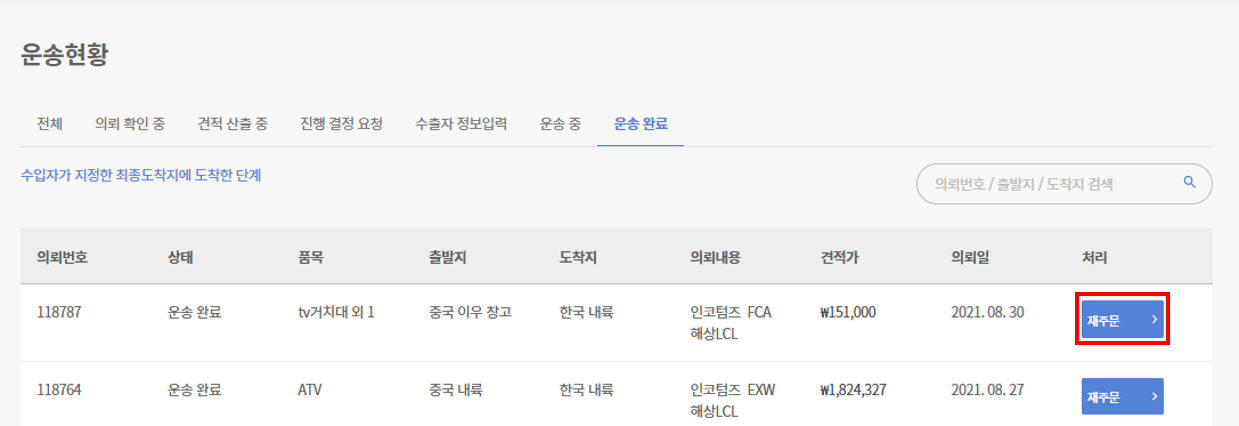
We have looked into the necessary information and input methods for requesting from SHIPDA under EXW conditions, as mentioned above:) For future purchases from the same exporter (seller), you can skip the above procedure and press 'Reorder' in the transport completion tab.