[Fulfillment-Shopping Mall Integration Management] Integrating Shopify Overseas Store
 ? To use the Shopify fulfillment service, you need to be a member and established on Shopify.
The steps to set the Shopify API are as follows.
- [Shopify > Sales Channels > App and Sales Channel Settings ] Click the menu.

- In the App and Sales Channel menu, click App Development at the top right, then create an app.

3. In the app creation menu, set the app name to sellernote. The app developer will be displayed with the subscriber's email.
4. In the app development menu, click all items corresponding to the configuration tab. After setting all confirmed permissions, click the save button.
5. After setting permissions, click the app installation button in the API Credentials tab.

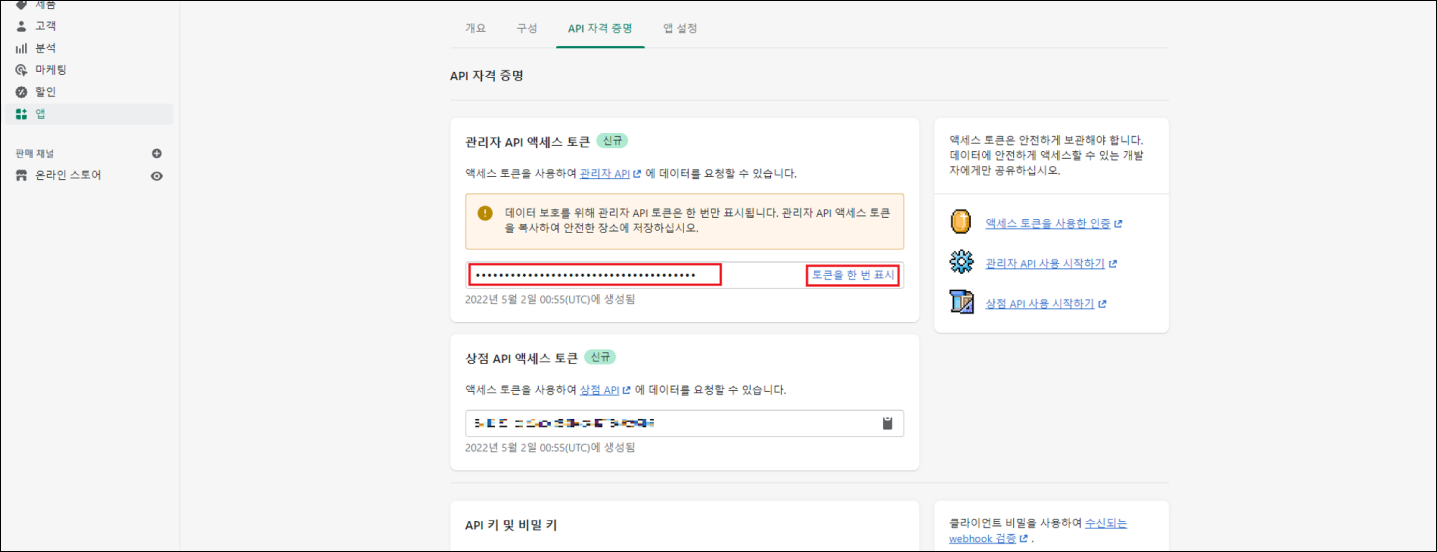
6. Copy the value corresponding to the administrator API access token displayed during app installation.
(This token can only be displayed once, so please make a separate note of it.)
This corresponds to the API access token value in Shopi’s Shopping Mall Integration Settings > Overseas Shopping Mall > Shopify Integration Settings.
7. Click Shopping Mall Integration Management > Shopping Mall Integration > Overseas Shopping Mall > Shopify Integration Settings in Shopi and enter the following values in the items. If you click the complete integration button after entering all, normal integration will be processed.
Shopping Mall Domain: Enter the ID value from the basic URL of the shopping mall.
EX) https://sellernote.myshopify.com/ In this case, only enter sellernote.
Administrator API Access Token: Enter the token value copied in step 6.
8. Once integration is complete, the status will change to ‘Integrating' in the registered “Shopping Mall Integration List”.
Also, you can check the products registered in Shopify from [My Page]-[Fulfillment]-[Shopping Mall Integration Management]-[Product Integration].

- Please note that there is no field for separate seller product codes and option management codes in Shopify.
?Unlink
- If you no longer want to use the shopping mall, you can unlink it.
- Click the “Unlink” link of the shopping mall in the list to complete the unlinking.
- Orders after unlinking will not be collected.
- Even if it is unlinked, already collected order information will be maintained as is.


